

Speed Up WooCommerce Checkout: Reducing Friction & Increasing Conversions


WooCommerce checkout is one of the most critical steps in the customer journey. It is where users decide whether to complete their purchase or leave.
Most WooCommerce checkout advice focuses on surface-level improvements: remove extra fields, enable guest checkout, add trust badges, and optimize page speed.
Those things matter, but they are rarely the full reason customers abandon checkout.
A slow or underperforming checkout is usually a symptom of a bigger issue: the checkout experience has not been treated as a revenue system. It has been treated as a form.
Your checkout is not just the final page of your WooCommerce store. It is the point where performance, trust, payment logic, shipping rules, customer expectations, and technical architecture all collide. If any part of that system creates hesitation, delay, or confusion, the customer may leave before completing the order.
What Makes WooCommerce Checkout Performance So Important?
Checkout optimization is not just about speed; it is about reducing friction. Users who reach checkout are already interested in buying. At this stage, even small delays or unnecessary steps can cause drop-offs.
That means your checkout needs to do two things well:
- Load quickly
- Guide users smoothly to completion
If your checkout is fast but confusing, users will hesitate. If it is simple but slow, they will leave.
Checkout Friction Is Not Always Visible
Many store owners think checkout friction means something visible, such as:
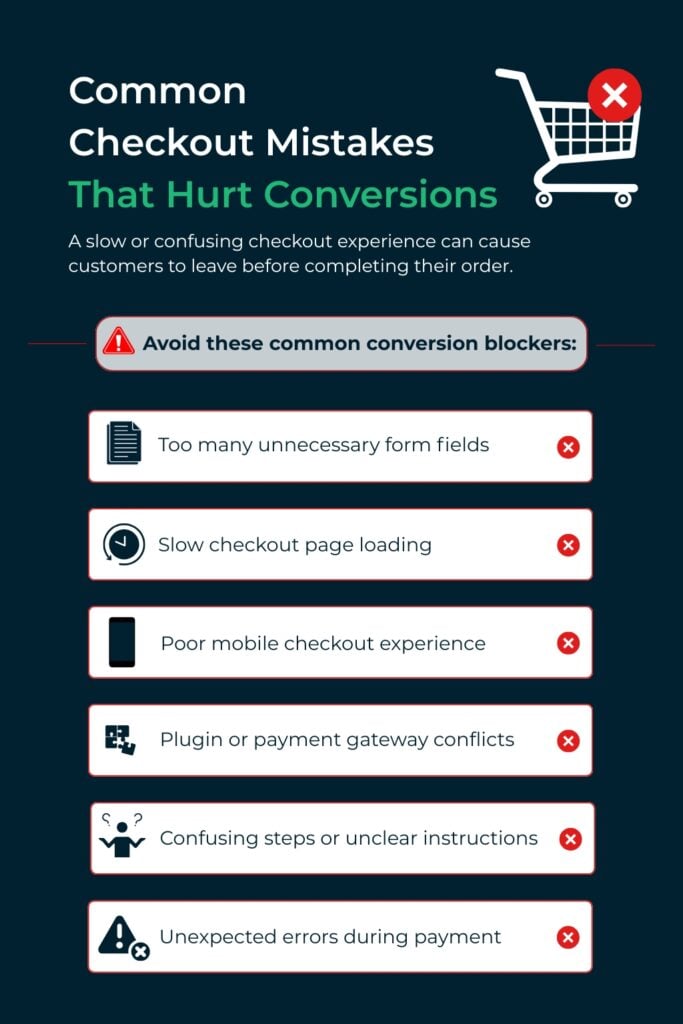
- A slow-loading checkout page
- Too many form fields
- A broken payment button
- A confusing layout
But some of the most expensive checkout problems are less obvious.
For example:
- Shipping costs appear too late
- The coupon field sends users away to search for discounts
- Payment fields shift on mobile
- Returning customers have to repeat too many steps
- Too many payment options create decision fatigue
- Third-party scripts slow down the final step
- Checkout refreshes every time a field changes
- Trust details are missing when the user is ready to pay
These issues may look small on their own.
Together, they create friction.
WooCommerce Checkout Often Becomes Too Heavy
WooCommerce is flexible, which is one of its biggest strengths. But over time, many stores add more and more tools to checkout.
These may include payment gateways, shipping plugins, tax calculation tools, fraud prevention tools, subscription plugins, upsell tools, coupon tools, email marketing scripts, analytics codes, and loyalty program features.
Each tool may have a valid purpose. But together, they can make checkout slow, unstable, and difficult to manage.
This matters because checkout cannot be optimized like a normal page. You cannot rely on aggressive caching because checkout is dynamic. It depends on cart contents, customer sessions, shipping calculations, tax rules, payment information, coupon logic, and account status.
So the real question is not:
“Which plugin will make checkout faster?”
The better question is:
“What absolutely needs to run during checkout, and what can be removed, delayed, or simplified?”
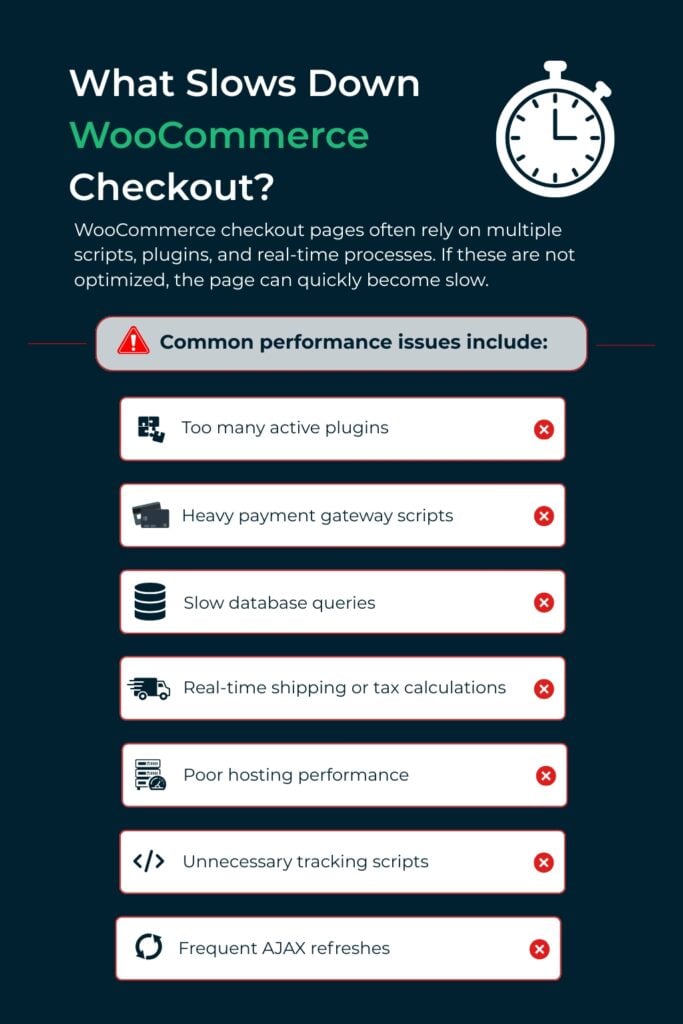
Start With the Scripts Running on Checkout
A WooCommerce checkout page often becomes slow because too many scripts are loading at the same time. Some are required for payments, shipping, taxes, fraud protection, or analytics. Others may come from plugins, theme features, pop-ups, sliders, tracking tools, or widgets that do not need to run during checkout.
This is one of the first areas to review because checkout should only load what is required to complete the transaction.
For example, your checkout page usually does not need:
- Homepage sliders
- Blog widgets
- Social media feeds
- Unused tracking scripts
- Pop-ups or promotional banners
- Extra theme scripts that do not affect checkout
- Product recommendation scripts that slow down the payment step
A good checkout review should identify which scripts are loading, which ones are essential, and which ones can be removed, delayed, or restricted from the checkout page.
Quick Tip
Keep the checkout page free of any header or footer scripts, sliders, or widgets that are not needed for the transaction.And payment and tracking scripts should load after the page is ready, not block it from rendering.
This small cleanup can make checkout feel faster, especially on mobile, where users are more sensitive to delays and layout shifts.
Reduce Checkout Dependencies, Not Just Checkout Fields
Removing unnecessary fields is helpful, but it is only one layer of checkout optimization.
A stronger checkout review should also look at what is loading and refreshing behind the scenes. A checkout page may look simple to the customer, but still be technically overloaded.
For example, review:
- Which plugins are loading scripts on checkout
- Whether all payment gateways are actually needed
- Whether shipping rules are recalculating too often
- Whether marketing pixels are slowing down the final step
- Whether unnecessary AJAX requests are firing every time a field changes
- Whether plugins are loading assets on checkout even when they are not used
One of the biggest performance issues in WooCommerce checkout is unnecessary AJAX refreshes. WooCommerce checkout often updates dynamically when customers change shipping details, payment options, coupons, or billing fields. This is useful when it is needed, but too many refreshes can make checkout feel slow or unstable.
For example, if the checkout refreshes every time a customer types into a field, changes a shipping option, or edits their address, the page may feel like it is constantly reloading. This can create hesitation right at the point where the customer is ready to buy.
A better approach is to limit checkout updates to actions that truly need recalculation, such as shipping method changes, coupon validation, tax updates, or payment method selection.
The goal is not just to remove fields. The goal is to reduce the number of scripts, refreshes, and decisions competing for the customer’s attention.
A fast checkout is not just clean on the front end. It is controlled on the back end.
Pro tip
If you are still using the classic WooCommerce checkout added through the [woocommerce_checkout] shortcode, consider testing the block-based checkout instead.
To do this, go to:
Pages → Edit your Checkout page → remove the shortcode → add the “Checkout” block
The block-based checkout can improve the checkout experience because it is built for a more modern WooCommerce setup. WooCommerce’s own documentation also notes that the Checkout block includes dynamic checkout fields and totals, and payment options display based on available and compatible payment methods.
Before switching, test plugin compatibility carefully.
Treat Payment Options as Conversion Paths
Many store owners assume more payment options automatically improve checkout. That is not always true.
Every payment method can add extra scripts, validation steps, loading time, styling, and decision-making for the customer. The goal is not to display every possible payment option. The goal is to make the customer’s preferred payment path easy to recognize and complete.
This is also where trust matters. Customers should immediately understand which payment methods are available, whether the checkout is secure, and what will happen after they place the order. If you use WooPayments or trusted payment add-ons, make sure the available options are clearly displayed without overwhelming the customer.
For example, if most customers use credit cards and PayPal, those should be easy to find. If mobile users prefer Apple Pay or Google Pay, express checkout should be visible early. If buy now, pay later increases average order value, it should be placed where it supports the buying decision. If a payment method is rarely used but slows down checkout, it may need to be removed or deprioritized.
Checkout speed is not only technical speed. It is also decision speed.
The faster a customer can identify how they want to pay, the more likely they are to complete the purchase.
Use Conditional Logic to Make Checkout Feel Shorter
The best checkout is not always the shortest checkout for everyone. It is the checkout that adapts to the customer’s situation.
A returning customer should not have to complete the same steps as a new customer. A digital product order should not require shipping fields. A local pickup order should not need the same delivery workflow. A retail customer should not see wholesale-only fields.
Conditional logic can make checkout feel faster by only showing what matters.
This can include:
- Hiding shipping fields when they are not needed
- Removing company fields for retail buyers
- Showing pickup options only for eligible locations
- Displaying tax-exempt fields only for qualified customers
- Simplifying checkout for digital products
- Prioritizing express payment options for mobile users
The objective is not just fewer fields. The objective is less mental effort.
A checkout that feels relevant also feels faster.
Keep the Checkout Layout Simple and Easy to Control
Checkout should feel predictable. Customers should always know what information is needed, why it is needed, and what to do next.
A simple layout can reduce hesitation and prevent avoidable errors. This includes clear field labels, helpful explanations, visible error messages, and a logical order of steps.
For example:
- Use clear field labels instead of vague placeholders
- Explain fields that may cause confusion
- Show shipping costs and delivery expectations as early as possible
- Keep error messages close to the field that needs attention
- Make the order summary easy to review
- Keep the primary checkout button visible and easy to understand
- Avoid unnecessary distractions around the payment area
This matters because customers do not always abandon checkout because the site is technically broken. Sometimes they leave because the process feels unclear.
If a customer does not understand a field, cannot find the error, or feels unsure about the final cost, they may stop before placing the order.
A strong WooCommerce checkout gives users enough control to complete the purchase confidently without making them think too hard.
Optimize Mobile Checkout as Its Own Experience
Mobile checkout should not be treated as a smaller version of desktop checkout.
Mobile users deal with smaller screens, touch-based input, slower connections, more distractions, and less patience for errors. A WooCommerce checkout may technically “work” on mobile but still perform poorly.
Mobile checkout should feel simple, linear, and easy to complete. Fields should be easy to tap. Buttons should be large enough. The keyboard should match the field type. Address fields should be easy to complete. Payment fields should load smoothly. Pop-ups should be removed from checkout.
The order summary should also be easy to review without taking over the screen.
If mobile traffic is strong but conversions are weak, the issue may not be traffic quality. The issue may be checkout usability.
Practical quick-win
A mobile-first checkout review should test the full purchase process on an actual phone, not just in a desktop responsive preview. Check whether form fields are easy to tap, whether payment buttons are visible, whether error messages are clear, and whether the order summary is easy to expand and collapse.
Also check whether any scripts, pop-ups, sticky bars, or widgets cover important checkout elements on smaller screens. A checkout that looks fine on desktop can still feel frustrating on mobile.
Measure Checkout Behavior, Not Just Page Speed
Page speed scores are useful, but they do not tell the full checkout story.
A checkout can score well and still convert poorly. Instead of only asking, “How fast is the page?” store owners should also ask where the purchase journey is breaking down.
Look at questions like:
- Where are users abandoning checkout?
- Are mobile users dropping off more than desktop users?
- Are users leaving after shipping costs appear?
- Are coupon fields causing people to leave the site?
- Are payment failures being tracked?
- Are customers reaching checkout but not clicking “Place Order”?
- Do certain products have higher checkout abandonment?
This shifts the focus from speed alone to completion.
The goal is not just a faster checkout. The goal is a checkout that more people finish.
Be Careful With Upsells at Checkout
Upsells can increase revenue, but they can also hurt conversions if they are placed poorly.
At checkout, the customer has already made a buying decision. Adding too many offers, pop-ups, add-ons, countdown timers, coupon prompts, or product recommendations can create hesitation.
The checkout should protect the primary conversion.
Pre-checkout upsells can work when they are relevant to the cart. Post-purchase offers can also work because the initial transaction is already complete. But interrupting the payment decision with too many choices can reduce completion rates.
The order should come first. Expansion opportunities should come second.
WooCommerce Checkout Quick Wins to Review First
If your WooCommerce checkout feels slow or customers are abandoning orders, start with the areas that usually create the most friction:
- Disable unnecessary checkout scripts
- Remove sliders, pop-ups, widgets, and extra scripts from checkout
- Reduce unnecessary AJAX refreshes
- Delay payment and tracking scripts so they do not block rendering
- Review whether every payment gateway is still needed
- Keep checkout fields clear, simple, and easy to complete
- Use clear field labels and helpful explanations
- Make error messages visible and easy to fix
- Test checkout on mobile first
- Check whether the block-based checkout is a better fit than the classic shortcode checkout
These changes are practical because they focus on the checkout experience customers actually feel. The goal is to make the page faster, easier to understand, and easier to complete.
Conclusion
Speeding up WooCommerce checkout is about removing barriers and creating a smooth buying experience.
When done right, it directly improves conversions and revenue. The stores that succeed are not doing more; they are simply doing it better and more efficiently.
Need Help Improving Your WooCommerce Checkout?
If your checkout is slow or users are abandoning carts, the issue is usually not just speed; it is the overall experience.Improving performance, simplifying checkout, and maintaining your site properly can make a significant difference.
WP Minds can help review your checkout experience, identify performance bottlenecks, simplify the buying flow, and keep your WooCommerce store running smoothly through ongoing WooCommerce maintenance and optimization.

Popular Guides
View All Guides

