

WooCommerce SEO – A Comprehensive Guide


Your products buried on the 3rd page on Google is the reason you need WooCommerce SEO.
Implementing WooCommerce SEO is simple: Use a reliable SEO plugin, optimize your sitemap, and ensure your structured data and page speed are configured correctly.
For faster results, focus on indexing, schema markup, and product-specific keyword clusters.
In this article you’ll learn
- What is WooCommerce SEO?
- Why WooCommerce SEO is critical for your store
- How to implement SEO for WooCommerce for better results.
- Common mistakes that kill traffic
- Recommended SEO plugins to simplify your work
At the end of the article, you will find the answers to your queries.
Let’s dive in!
What is WooCommerce SEO?
WooCommerce SEO is the process of optimizing your WordPress/WooCommerce store so that your products, categories, and content rank higher on search engines, gain more visibility, and attract organic sales.
E-commerce SEO is slightly different from regular CMS SEO — and here’s why:
In WordPress or any other CMS, SEO activities mainly focus on ranking blogs or service pages using the article schema or the service schema.
But in WooCommerce SEO, the focus shifts toward ranking products, categories, variations, SKUs, and handling structured product data — including reviews, pricing, and availability — to help search engines understand your store and display rich results.
Here is the comparison table
| Feature | WordPress/CMS SEO | WooCommerce SEO |
|---|---|---|
| Primary Goal | Visibility & content ranking | Product visibility & sales |
| Focus Pages | Blogs, service pages, landing pages | Product & category pages |
| Schema | Article, FAQ, Local | Product, Review, Breadcrumb |
| Technical Needs | Basic structure, speed, metadata | Complex architecture, filters, canonicalization |
| Success Metrics | Organic traffic, leads | Organic sales, conversions |
| Tools | Yoast, Rank Math | Yoast + WooCommerce extensions, Schema Pro, WP Rocket |
In short, WordPress SEO helps people find services and content,
WooCommerce search optimization helps people find and buy your products.
Check the complete SEO guide
Why WooCommerce SEO Is Important For Your Store
It ensures your store runs efficiently, loads fast, and communicates clearly with search engines so your products actually get found and purchased.
Most store owners neglect SEO because they assume plugins handle all the SEO. Well, they don’t.
Search Engine Optimization is the foundation of your store’s visibility. Without it, even paid ads struggle to convert. Here are some stats that you may find interesting:
- 68% of online experiences start with a search engine.
- 43% of all eCommerce traffic comes from organic search
- Schema-enhanced listings can increase CTR by up to 30%
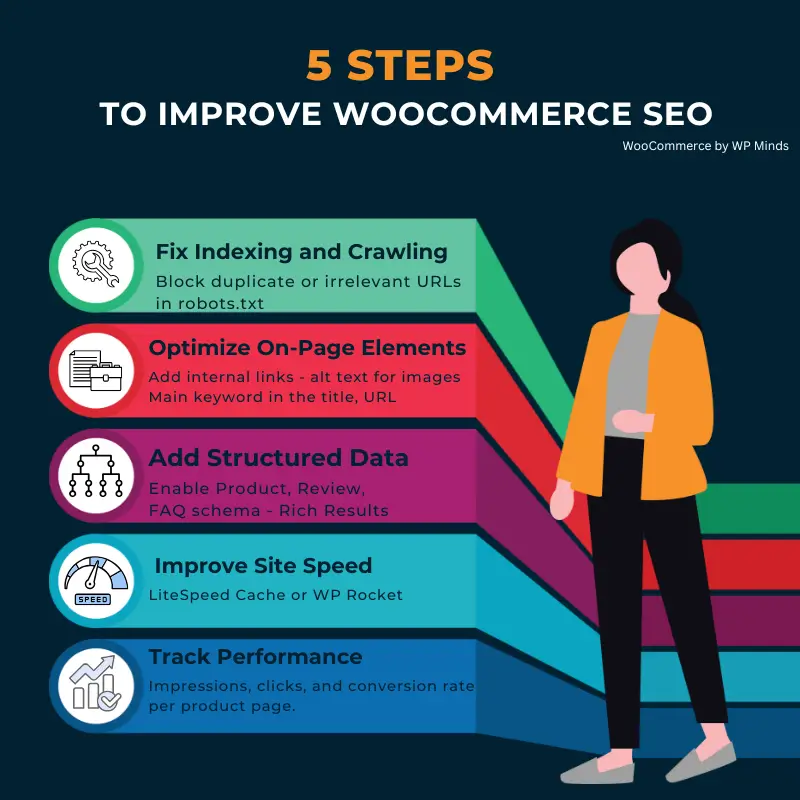
How To Do SEO For WooCommerce
Below is the step-by-step process
- Start with keyword research
Use tools like Ahrefs, Semrush, etc.
- Optimize your product pages
Use separate URLs for target products and choose canonical for better indexing, and use primary keywords in your title, description, and alt text.
- Implement structured data (schema markup)
Use the schema plugin to implement structure data easily.
- Improve performance and page speed
Invest in technical SEO
- Optimize category pages
Implement UX and SEO best practices
- Build high-quality backlinks
Outreach and guest posts from niche-specific websites
- Fix technical issues
Continuously monitor and optimize web pages for UX
- Maintain website health
Continuous audits and website maintenance
Step 1: Start with Keyword Research
Every SEO campaign begins with understanding what your potential customers are actually searching for.
How to do:
- Use tools like Ahrefs, Semrush, or Google Keyword Planner to find product-focused keywords.
- Look for transactional intent terms — people searching “buy,” “for sale,” “best [product type],” etc.
- Map primary keywords to product pages and secondary ones to category pages or blogs.
- Use long-tail keywords — they are good for ranking and AI visibility.
Add filters like country, device, and search intent in your keyword research. That’s how you target qualified buyers, not just traffic.
Step 2: Optimize Your Product Pages
Each product page should feel like a standalone landing page that can rank on its own.
How to optimize:
- Use clean, keyword-focused URLs (e.g., /products/ceramic-mug-blue).
- Write unique titles for every product — no duplicates.
- Add detailed descriptions that explain the product’s value, not just its specs.
- Include keywords naturally in the title, description, and alt text.
- Optimize product images (compress + use descriptive filenames).
- Add internal links to related products or blog content.
Step 3: Implement Structured Data (Schema Markup)
Using structured data allows Google to better interpret your products and showcase them with enhanced snippets, such as pricing, ratings, and availability
Key schemas to add:
- Product Schema: Price, SKU, availability.
- Review Schema: User ratings, testimonials.
- Breadcrumb Schema: Helps with better site hierarchy in search results.
Step 4: Improve Performance & Page Speed
Website load time is the KPI for Google rankings. Fast sites rank higher and convert better.
How to improve:
- Use a lightweight theme (avoid heavy multipurpose ones).
- Enable caching (via WP Rocket, LiteSpeed, or Cloudflare).
- Optimize images and enable lazy loading.
- Invest in good hosting with CDN support.
- Test speed regularly using PageSpeed Insights or GTmetrix.
Quick win: WooCommerce stores that load in under 2.5 seconds convert up to 65% better than slower stores. (data aggregated from sources across the web)
Get a quick free website speed audit for quick wins
Step 5: Optimize Category Pages
Category pages are SEO gold when optimized correctly. If you can only do the right categories optimization, you are halfway done with WooCommerce site performance optimization
How to optimize category pages:
- Do a comprehensive keyword research for the most appropriate words.
- Now add introductory content (50–100 words) explaining what the category is about with the primary keyword in the content.
- Optimize main keywords into title tags and meta descriptions.
- Use H2 subheadings for readability and semantic structure.
- Add internal links to top products and relevant blog posts.
- Focus on UX — clean filters, clear CTAs, and fast load times.
Step 6: Build High-Quality Backlinks
Backlinks still matter, but do not keep yourself busy with the traditional backlinks; for e-commerce, go for content marketing, digital Pr, and the trump card is broken link building
How to do off-page for e-commerce:
- For guest blogging, try to go for link exchange instead of paid guest posts. This will save you a lot of money, but make sure you do it from relevant websites and stores.
- Collaborate with influencers or partners for co-created content.
- Create shareable guides or tools related to your products.
- Get listed in niche directories or product review sites.
Step 7: Fix Technical Issues Regularly
SEO isn’t “set it and forget it.” WooCommerce stores evolve — new products, plugins, updates.
How to fix technical issues
- Regularly audit to find broken links and 404 pages.
- Find and eliminate duplicate meta tags or product variations.
- Resolve indexing issues via Google Search Console (GSC)
- Set up a 301 redirect after a product URL change or a new product replaces the existing one
We suggest running weekly or at least monthly audits for timely fixes of these issues, so your store keeps running smoothly.
If you are busy with your sales, our maintenance service has you covered.
Step 8: Maintain Website Health & Continuous Audits
Even the best SEO setup won’t last if your site isn’t maintained.
How to maintain your store
- Regularly update WordPress, WooCommerce, and all plugins.
- Monitor uptime and security.
- Revisit keyword performance every quarter.
For better results, you need continuous maintenance to keep your website healthy in the green zone.
WooCommerce website maintenance services for professionals
10 Reasons You Should Invest In WooCommerce SEO
- Get your products in front of more customers
- Drives consistent, high-quality traffic.
- Improve conversion rate through better targeting.
- Build credibility and trust for your brand
- Enhances user experience.
- Reduces ad spend dependency.
- Helps your store load faster and perform better.
- Fix indexing and crawling issues
- Maximizes ROI on every marketing channel.
- Builds a long-term organic growth funnel
If you have already invested in the SEO for WooCommerce and you are not getting results, these might be the main reasons
- Indexing & Crawling Problems
- You are targeting the wrong keywords
- You have created duplicate product pages
- You are missing or implementing an incorrect schema
- Poor On-page optimization
- Weak product descriptions and meta tags
Common Mistakes That Kill Traffic
Your store could be great, but if Google can’t find your products, no one will.
Here are the top WooCommerce SEO mistakes that prevent your products from ranking
- Slow Site Speed
- Poor keyword strategy
- Missing schema markup
- Weak internal linking
- Thin or duplicate product descriptions
- Duplicate URLs that are confusing Google
- Mobile experience gaps
- Your products aren’t getting indexed
- Plugin overload & SEO misconfiguration
In short, these issues confuse search engines and weaken your site’s trust signals, making it harder for products to appear in top results
SEO fixes these issues that hinder your products from ranking.
Best SEO Plugin for WooCommerce
The best and easiest way to implement SEO best practices is by using an SEO plugin. The following plugins simplify and automate most SEO tasks
- Rank Math – For stores with 500+ products needing automation
- Yoast SEO – Easy interface for beginners needing easy UI
- All in One SEO (AIOSEO) – Best for beginners with WooCommerce-specific settings.
- Schema Pro – Adds product schema, ratings, and rich snippets. But you need a setup knowledge for this.
- WP Rocket – Enhances speed and performance for better Core Web Vitals.
Recommended Plugins for WooCommerce SEO
It’s super easy to use plugins to add specific functionality to your website. These are the recomended plugins for WooCommerce
| Plugin | Use Case |
|---|---|
| Rank Math SEO | Complete WooCommerce integration with schema and analytics |
| AIOSEO | Simplified SEO setup for store owners |
| Schema Pro | Adds advanced schema markup |
| WP Rocket | Optimizes site performance |
| ShortPixel | Compresses product images |
| Ahrefs / Semrush | Keywords, backlinks, and content tracking |
Running multiple SEO or schema plugins creates markup conflicts and sitemap errors – stick with one well-optimized SEO plugint/
Conclusion
Wrapping up, above is the comprehensive guide on WooCommerce SEO to make sure your store run and ranks well.
Webstore SEO is not just about the right keywords or writing the best meta title and description for your products; it also involves keeping the site healthy
Ready to increase your store visibility? We can help
- Optimize the Woo page speed
- WooCommerce development for a high-converting online store.
Get in touch! Book your free consultation.
How do I add SEO to WooCommerce?
Install a plugin like Rank Math or Yoast, set your canonical URLs, optimize titles, and submit an XML sitemap to Google Search Console
How to do keyword research for WooCommerce?
Start with category-level intent keywords (“Buy career coaching”) and branch into product-level long-tails (“ Career Coaching that saves your future”).
Use tools like Ahrefs or Ubersuggest to find search volume and buyer intent.
How do I write SEO-friendly product descriptions?”
Write a user centric content, ocus on benefits + features. Add primary keywords naturally in titles, H2s, and first 100 words Include FAQs to trigger People Also Ask results
How to add review schema to WooCommerce products?
Use your SEO plugin’s schema settings or install a plugin like WP Review Pro to automatically generate JSON-LD markup.

Popular Guides
View All Guides

