
10 Best LMS Features for Coaches


An LMS for a coaching business needs to do more than host lessons.
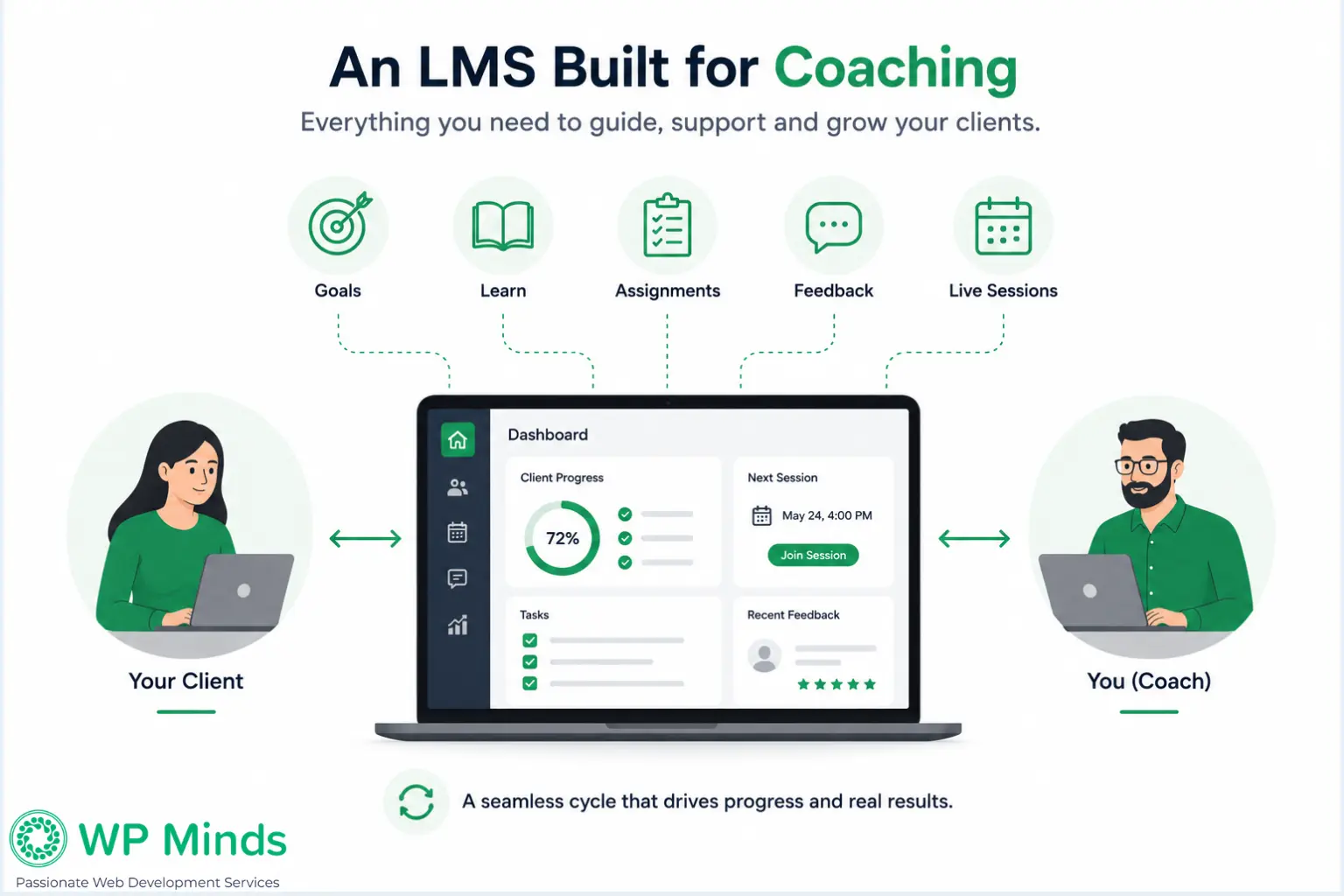
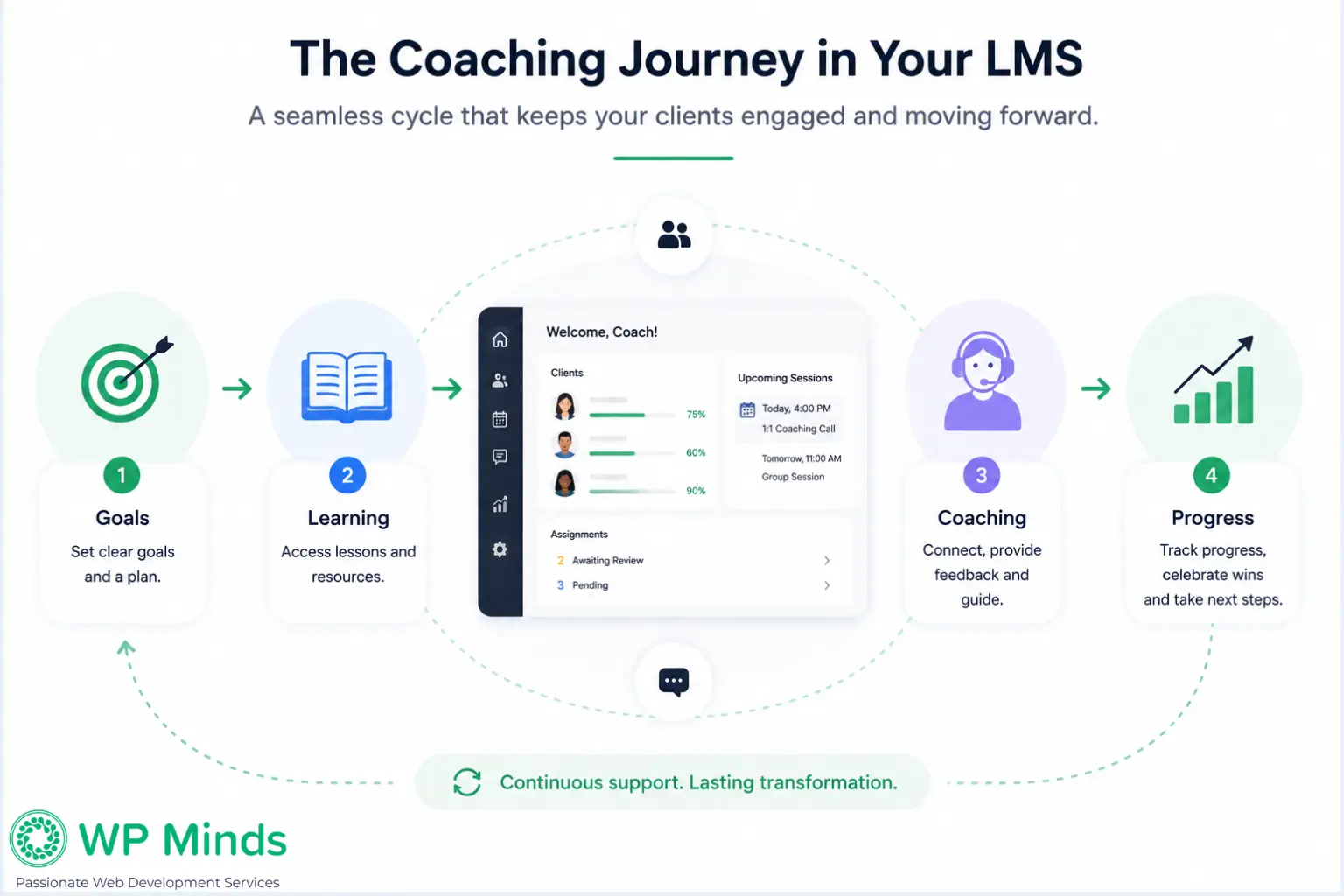
Coaches work directly with people. They set goals, review progress, give feedback, hold live sessions, assign next steps and adjust the program as clients develop. The technology should make those activities easier rather than forcing the coach to manage them across several disconnected tools.
That changes which LMS features matter most. A course creator may primarily need a course builder and a way to deliver lessons. A coach needs visibility into individual clients and tools that support an ongoing relationship.
Here are the most useful LMS features to consider when building or improving an online coaching program.
Read More: How to start an online coaching business in 2026
Why Coaches Need Different LMS Features
Traditional online courses are often designed around content completion. A student enrolls, works through lessons, completes activities and finishes the course.
Coaching is usually less linear.
A client might complete a lesson, discuss it during a private session, receive a new action item, submit work for feedback and then follow a different path based on what the coach observes.
Group coaching adds another layer because the platform may need to support shared sessions and resources while still keeping certain client information private.
Features such as quizzes, payments, memberships, drip content and course creation can still be useful. However, those standard features alone do not make an LMS well suited to coaching.
The following capabilities have a more direct impact on the coaching experience.
1. Client Progress Tracking That Goes Beyond Lesson Completion
Basic LMS reporting may tell you that a client completed six out of ten lessons. A coach often needs more context.
Useful client progress tracking can include:
- Current goals
- Milestones achieved
- Assigned action items
- Outstanding work
- Previous assessments
- Session attendance
- Coach feedback
- Program status
Imagine a coach preparing for a client call. Instead of checking email threads, spreadsheets and lesson reports, they can open the client’s profile and quickly see what has happened since the previous session. That makes progress data useful for coaching rather than simply administrative reporting.
In practice, the most useful coaching dashboards are built around the decisions a coach needs to make, not just the data an LMS can collect.
Look for an LMS that helps you answer: Where is this client now and what needs attention next?
2. A Coach Dashboard for Managing Clients
A learner dashboard shows clients what they need to do.
A coach dashboard should do the opposite: show the coach what needs their attention.
For example, it might display:
- Upcoming coaching sessions
- Recently completed activities
- Work waiting for review
- Clients falling behind
- Current goals
- Unanswered messages
- Upcoming milestones
This becomes increasingly valuable as a coaching practice grows. Managing five clients from memory may be possible. Managing 30 clients across several programs is much harder.
A useful dashboard reduces the amount of time spent searching for information and makes it easier to prepare for each client interaction.
3. Live Session and Scheduling Integration
Live conversations remain an important part of many coaching programs.
Your LMS should make it easy for clients to move between learning material and coaching sessions without wondering where the meeting link is or when the next call takes place.
Depending on your model, useful functionality may include:
- Calendar integration
- Session booking
- Zoom or video conferencing links
- Automated reminders
- Group session schedules
- Attendance records
- Session history
The ideal workflow is simple. A client logs in, sees their next appointment, joins the session and returns to the same platform afterward for their next action. This is particularly useful when a program combines self-paced learning with one-on-one coaching.
Read More: LearnDash Zoom Integration – A Comprehensive Guide
4. Support for One-on-One and Group Coaching
Not every coaching program uses the same delivery model. You may offer private coaching, cohorts, mastermind groups, workshops or a combination of several formats. Your LMS should reflect the way your program actually operates.
For group coaching, you may need:
- Cohort-specific content
- Shared resources
- Group announcements
- Live session access
- Community or discussion areas
- Group assignments
Private coaching requires different controls. Clients may need access to personal goals, private feedback, submitted work or session notes that should not be visible to other members.
A platform that supports both shared and private spaces gives you more flexibility as your offers evolve.
5. Personalized Learning Paths
Coaching programs often begin with a framework, but not every client needs exactly the same next step.
One client may need additional work on a foundational skill. Another may already understand that topic and be ready for something more advanced. Personalized learning paths allow you to adapt the experience without rebuilding an entire program.
A coach could:
- Assign a specific lesson after a session
- Unlock a resource based on a client’s goal
- Recommend additional exercises
- Skip material the client has already mastered
- Create different paths for different client types
This is different from simply releasing the same content to everyone on a schedule.
Personalization makes the LMS support the coaching relationship instead of limiting it to a fixed curriculum.
6. Coaching Assessments and Reflection Tools
Assessments for coaches are not always about getting the correct answer. Sometimes the goal is to understand where a client is starting, how their thinking has changed or what they need help with next.
Useful assessments may include:
- Intake questionnaires
- Self-assessments
- Goal-setting forms
- Confidence ratings
- Reflection questions
- Periodic progress reviews
- End-of-program evaluations
For example, asking a client to rate their confidence in a skill at the beginning and again later can create a useful conversation about progress.
Open-ended responses can be equally valuable because they give the coach context before a session. The assessment should gather information that helps guide coaching decisions rather than simply generate a score.
7. Assignments, Feedback and Accountability
Coaching usually involves action between sessions. The LMS should provide a clear place for those commitments to live.
A coach might assign a worksheet, ask a client to practice a technique, request a document or set a specific action to complete before the next meeting.
Useful functionality includes:
- Assignment submission
- Private coach comments
- File uploads
- Completion deadlines
- Revision requests
- Action-item status
- Feedback history
The benefit is continuity. The client can see what they agreed to do, while the coach can review what happened before the next conversation. That creates a stronger accountability system than relying on scattered emails and handwritten notes.
Research on online learning also highlights the value of feedback. A 2024 study found that learners who received feedback based on their learning activity showed higher engagement and task-completion rates, reinforcing the importance of feedback and progress information in an online learning environment.
Source: Springer
8. Member Access Control for Different Coaching Relationships
Member access control is particularly important when one LMS contains several offers or client groups.
A private coaching client should not automatically see another client’s materials. A group participant may need access only to their cohort. An advanced client may require resources that are not relevant to beginners.
Access can be based on:
- Coaching program
- Cohort
- Client type
- Role
- Program stage
- Assigned resources
Think about access from the client’s perspective as well. People should see the information that is relevant to them without having to navigate through courses and resources they cannot use.
Good access control improves privacy and keeps the learning environment easier to understand.
9. A Clear Client Communication Hub
When coaching conversations happen across email, text messages, video calls and an LMS, important details can easily become difficult to find.
Centralizing key communication gives both sides a clearer record.
That could include:
- Private messaging
- Coach announcements
- Session summaries
- Feedback notifications
- New assignment alerts
- Reminders
The LMS does not necessarily need to replace every communication tool you use.
Its job is to make coaching-related information easy to locate so clients are not searching old messages to remember what they are supposed to do.
10. A Client Experience That Connects With Your Website
The coaching experience begins before someone logs into the LMS.
Potential clients may first discover a blog post, coaching page, webinar, case study or lead magnet. They then need to understand the program and decide whether it fits their needs.
This is why your LMS should not be planned separately from your website.
The need for a connected digital experience is also reflected in coaching research. The Digital Future of Coaching Report found that 76% of surveyed coaches would engage more in their own development if it were delivered through one digital platform, highlighting the appeal of a more connected digital experience.
Source: ResearchGate
Your website strategy can define how coaching fits into the broader business and which actions the website should support.
Your website content strategy can help explain the program, audience, outcomes and next steps clearly.
And your website conversion approach can reduce friction between discovering a coaching service and applying, enrolling or booking a call.
For a WordPress-based coaching business, professional WordPress design & development can help the public website and private learning environment feel like parts of the same experience rather than two unrelated systems.
When Does a Coach Need Custom LMS Functionality?
Standard LMS tools can handle many coaching programs.
Custom functionality becomes worth considering when your coaching process is distinctive enough that off-the-shelf features create workarounds.
For example, you might need:
- A custom coach/client dashboard
- Program-specific progress scoring
- Unique assessment workflows
- Automated actions based on milestones
- Specialized client profiles
- CRM synchronization
- Custom session records
- Multiple coaching roles with different permissions
This is where custom WordPress development may make sense.
The goal should not be to customize an LMS simply because you can. Custom development is useful when it removes a genuine operational problem or supports an important part of your coaching method.
Also Read: CRM For Coaches – Automate and Grow
Ready To Turn Your Coaching Program Into a Seamless Online Experience?
Choose LMS Features Around How You Coach
It is easy to compare LMS platforms by counting features. That is rarely the best approach for a coach. Start by mapping your actual coaching process.
Consider what happens when someone joins, what occurs between sessions, what you review before a call, how clients receive feedback and how you determine whether they are progressing.
Then look for the LMS features that support those activities.
For many coaches, the most valuable LMS is not the one with the longest feature list. It is the one that fits naturally into how they manage clients and deliver their coaching program.
The right LMS features depend on how you coach, how clients progress and how much of the experience you want to manage in one place.
If you are planning a WordPress-based coaching platform, WP Minds can help you plan and build an LMS around your coaching workflow, from the learning environment and client experience to the WordPress functionality behind it.
A well-planned LMS setup should make coaching easier to deliver, easier for coaches to manage and easier for clients to follow.
More Related Blogs:
- Appointment Booking System for Coaches: The Ultimate Guide
- 10 Best Course Creation Platforms to Create and Sell Courses online
- Best LMS for Selling Courses for WordPress in 2026
FAQs (Frequently Asked Questions)
What Features Should I Look for in an Online Coaching Platform?
Look for features that support how you actually work with clients. These may include client progress tracking, scheduling, live session integration, private feedback, personalized learning paths, coaching assessments, dashboards, communication tools and flexible access controls
What Software Do Online Coaches Use?
Online coaches often combine an LMS with tools for video meetings, scheduling, email communication, payments, CRM management and website management. A WordPress-based setup can integrate several of these functions so clients have a more connected experience.
How Do Online Coaches Manage Their Clients?
Coaches may use dashboards, client profiles, progress records, session scheduling, assignments, notes and communication tools to manage clients. The exact system depends on whether the coach works one-on-one, with groups or through a hybrid coaching and course model.
What Features Do Coaches Need to Manage Clients Online?
The most useful client-management features include progress visibility, goal tracking, session scheduling, task assignment, feedback, private communication, assessments and a central client history. These tools help coaches understand what has happened without piecing information together from several systems.
Do I Need Coaching Software If I Only Have a Few Clients?
Not necessarily. A coach with a small number of clients may be able to work effectively with a simple combination of scheduling, video calls, email and shared resources. An LMS becomes more valuable when managing content, progress, assignments or multiple clients starts creating unnecessary administrative work.
What Is the Difference Between an LMS and a Coaching Platform?
An LMS is primarily designed to organize, deliver and manage learning. A coaching platform focuses more heavily on the relationship between coach and client, including sessions, goals, communication, feedback and accountability.
For coaches, the most useful setup often combines both: structured learning through an LMS with tools that support personalized coaching interactions.

Popular Guides
View All Guides