

Shopify Integration Guide – How to Automate, Scale, and Simplify


80% of Shopify’s top-performing stores use Shopify integration to automate sales, marketing, and operations.
Running an online store is exciting until you realize how much time you spend on repetitive tasks.
However, integrating Shopify with the right tools helps you scale, save time, reduce error costs—and convert more sales.
On average, a Shopify store uses 6–8 integrations, though larger stores may use 15 or more depending on complexity.
In this article, you will learn
- What is Shopify integration?
- Why Shopify integrations matter
- Types of Shopify integrations
- Best Shopify integrations to grow your business
- How to use Shopify integrations
Let’s dive in!
What is Shopify Integration?
Shopify integration is the process of adding functionalities to your store by connecting it with third-party apps and platforms.
Shopify app integrations work the same as plugins on WordPress. These extensions automate workflows, improve customer experience, and make store management more efficient.
For example:
- Connecting Shopify with Klaviyo automates personalized email campaigns.
- Linking Odoo ERP syncs inventory, orders, and accounting.
- Integrating ShipStation automates shipping labels and order tracking.
Why Shopify Integrations Matter?
Shopify’s built-in tools are great for getting started, but scaling requires automation.
As your business grows, so does complexity — more customers, more products, more data.
That’s how integrations help you
- Save time by automating repetitive work
- Eliminate manual data errors
- Improve marketing personalization
- Simplify fulfillment and reporting
- Create a more seamless customer experience
Types of Shopify Integrations
Integrations are applied depending on the need for specific functionality; sometimes, one app adds only one function.
Here are the main categories of integrations you’ll find useful, depending on your business needs:
- Marketing & Sales: Shopify integrations for marketing, automating campaigns, and building customer lists
- Payments & Finance: Simplify transactions and bookkeeping, e.g, Stripe, PayPal, QuickBooks
- Customer Support: Offer faster and better help. e.g, chatbots, AI assistants, helpdesk systems
- Logistics & Fulfillment: Track orders, do inventory management, and automate deliveries. e.g, ShipStation, Printful, afterShip.
- Analytics & Reporting: Understand your traffic and conversions. e.g, Google Analytics.
- ERP & CRM: Manage stock and supply chain. e.g, hubspot, salesforce, odoo.
Explore Shopify maintenance plans for smooth integrations.
10 Best Shopify Integrations to Grow Your Business
These are the 10 best integration tools that help you grow your Shopify store with ease. Install only what you’ll use regularly.
More tools slow down the speed of your Shopify store.
- Print-on-Demand Tools
- CRM Integrations
- Payment Gateways
- Email Marketing & SMS Platforms
- Chatbots & AI Integrations
- Inventory & ERP Solutions
- Shipping & Fulfillment Integrations
- Analytics & Reporting Tools
- Customer Support Platforms
- Mobile App Integrations
Here’s the “Most Used Integrations” section converted into a clear table format:
| Category | Popular Integrations |
| Shopify integrations for design | Printful, Printify |
| Shopify integrations for sales optimization | Stripe, PayPal, Square |
| Shopify integrations for customer management | HubSpot, Salesforce, Zoho CRM |
| Shopify integrations for marketing automation | Klaviyo, Mailchimp, Omnisend |
| Shopify integrations with marketplaces | Amazon, eBay, Walmart, Etsy |
| Shopify integrations for inventory & ERP | Odoo, TradeGecko |
1. Shopify Print-on-Demand Tools Integration
Print-on-demand platforms are inventory providers; you have to create designs, generate a mockup, and list on your store.
When you receive an order, these platforms create, fulfil, and deliver orders, take their charges, and your profit is sent to you.
- What they do: The design tools automate product design, order fulfilment, and shipping without holding inventory.
- Ideal tools: Printful, Printify, Gelato
- Best for: Creators and small brands testing products with minimal risk.
2. Shopify CRM Integration
- What they do: Manage leads, track customer journeys, and run targeted campaigns. Sync Shopify order and customer data with CRM.
- Ideal tools: HubSpot, Pipedrive, Zoho CRM
- Best for: Turning Shopify data into actionable insights for better retention and upselling.
3. Shopify Payment Gateways Integration
- What they do: Ensure smooth checkout, multi-currency support, and secure transactions.
- Ideal tools: Stripe, PayPal, Shopify Payments
- Best for: Stores that need reliable, flexible payment processing for global customers.
4. Email Marketing & SMS Platforms
- What they do: Automate personalized email and SMS campaigns, including abandoned cart recovery and promotions.
- Ideal tools: Klaviyo, ActiveCampaign, Mailchimp
- Best for: Increasing repeat purchases and customer lifetime value through targeted communication.
5. Shopify Chatbots & AI Integrations
- What they do: Provide live chat, automated support, AI-driven product recommendations, and FAQs.
- Ideal tools: Gorgias, ChatGPT-powered apps
- Best for: Improving conversions and customer support efficiency with fast, intelligent responses.
6. Inventory & ERP Solutions
- What they do: Sync orders, inventory, and accounting in one platform for seamless back-office management.
- Ideal tools: Odoo Shopify Integration
- Best for: Merchants managing multiple channels or warehouses, avoiding double-entry errors.
7. Shipping & Fulfilment Integrations
- What they do: Streamline shipping, labels, tracking, and dropshipping order fulfilment.
- Ideal tools: ShipStation, Oberlo
- Best for: Saving time, reducing errors, and improving customer delivery experience.
8. Analytics & Reporting Tools
- What they do: Track profits, ad performance, user behavior, and key business metrics in dashboards.
- Ideal tools: Triple Whale, Google Analytics 4, Hotjar
- Best for: Merchants who want data-driven insights to optimize marketing and store performance.
Get insights on setting up Shopify Google Analytics
9. Customer Support Platforms
- What they do: Centralize support tickets, provide personalized assistance, and access customer order history.
- Ideal tools: Zendesk, Gladly
- Best for: Enhancing customer satisfaction and driving repeat purchases.
10. Mobile App Integrations
- What they do: Transform Shopify stores into native mobile apps and allow mobile management of orders, inventory, and fulfilment.
- Ideal tools: Tapcart, Shopify mobile management apps
- Best for: Merchants wanting operational agility and a better mobile shopping experience, crucial as mobile commerce grows rapidly.
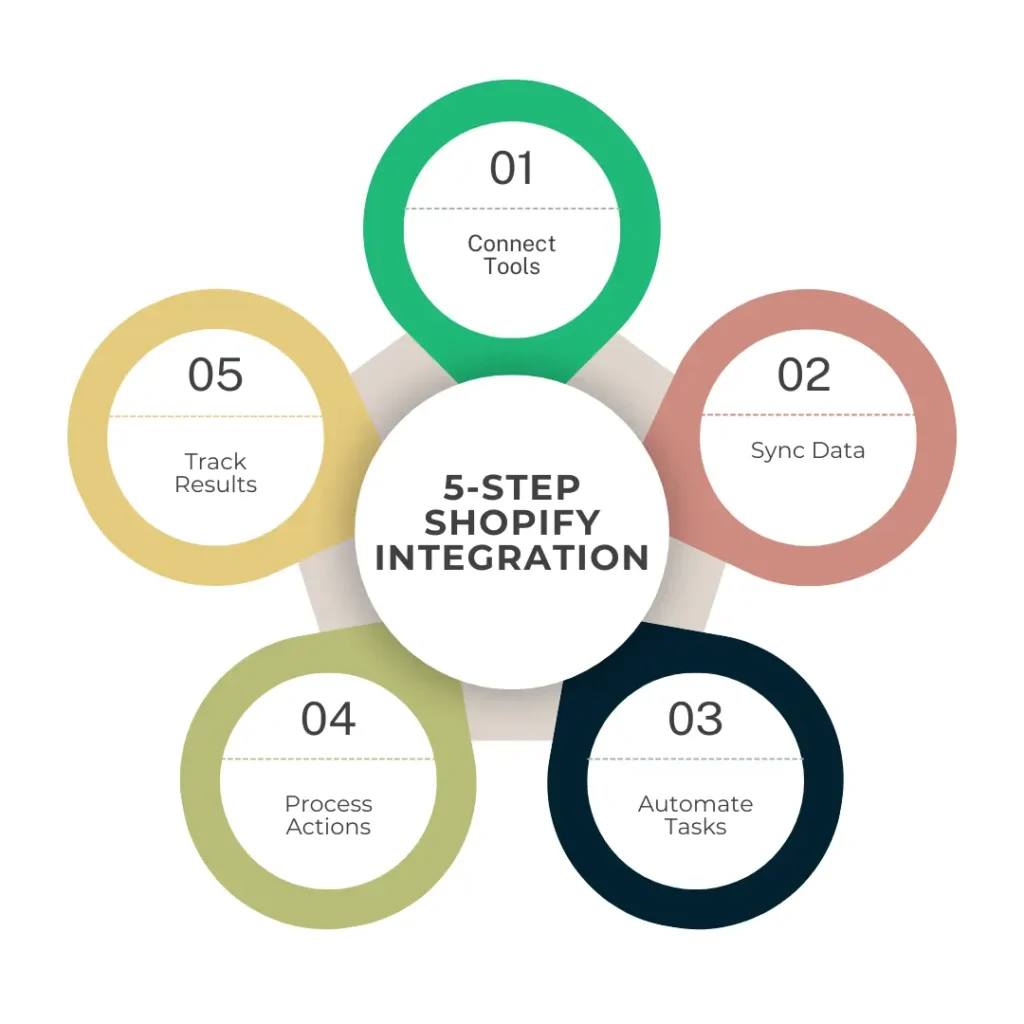
How To Perform Shopify Integration?
Using Shopify integration is mostly easy and free. You can connect them directly from the Shopify App Store or through API setup for more advanced tools.
Steps
- Go to the Shopify App Store
- Search for the tool you want to use.
- Read reviews and check compatibility with your region or theme.
- Click “Add app” and follow the connection instructions.
- Test it with a Shopify sample order or workflow before going live.
For complex setups (like ERP or AI), hire a Shopify expert to ensure:
- Secure data flow
- API stability
- Backup and scalability
Explore Shopify development services
Common Shopify Integration Challenges (and Fixes)
Integrations are risky you can face challenges and setbacks. It’s recommended to back up data before any integration.
| Challenge | Why It Happens | Quick Solution |
| Integration Conflicts | Apps may overlap or not support your region/currency | Choose apps with verified Shopify compatibility |
| Data Sync Errors | API misconfigurations | Run test transactions before going live |
| High Monthly Costs | Multiple apps with subscription fees | Compare ROI—keep only apps that save time or boost sales |
| Scalability Limits | Some apps lag under high order volumes | Choose integrations built for enterprise load |
How to Choose the Right Integration?
Before installing any app, ask yourself:
- Does this solve a real problem?
- Will it save me time or increase revenue?
- Is it compatible with my current setup?
- Can it grow with my store?
- Is the cost justified by the benefit?
If you can’t answer “yes” to at least two of these, skip it for now.
Conclusion
Wrapping up, a Shopify integration connects your store with another tool or service to extend what Shopify can do on its own.
Think of it like adding building blocks to your store. But too many extensions slow down the speed.
From marketing automation to reporting dashboards, every tool you connect should make your business faster, smarter, and more profitable.
Ready to integrate Shopify with the right tools? Need help setting up or optimizing your Shopify integrations?
We can help
Get in touch! Book your free consultation.
FAQS
What are the most popular Shopify integrations?
Print-on-demand tools (Printful, Printify), CRMs (HubSpot), and payment gateways (Stripe)yre
What is Odoo Shopify integration used for?
It connects Shopify with Odoo ERP for better order, inventory, and accounting management.
Can I integrate ChatGPT with Shopify?
Yes, ChatGPT can power AI chatbots, product recommendations, and customer support workflows.
Is Shopify integration free?
Some integrations are free; advanced ones charge monthly based on usage.
Do I need a developer for Shopify integration?
Not always. Many integrations are plug-and-play, but complex API setups (like Odoo or ChatGPT) may require professional help.

Popular Guides
View All Guides

