

Website Checklist: The Ultimate Guide


This is an ultimate website checklist covering everything you need to plan, design, optimize, and maintain a high-performing coaching website.
You’ve probably searched for different checklists, frameworks, or templates, but not anymore.. In this guide, you’ll find every type of website checklist you need, from planning and design to SEO, compliance, audits, and migrations.
A checklist ensures you cover all critical steps pre-determined to minimize errors.
Let’s dive in!
Types of Website Checklists Covered
- Website Planning Checklist
- Web Design Checklist
- Website Compliance Checklist
- Website SEO Checklist
- Website Audit Checklist
- Website Migration Checklist
1. Website Planning Checklist
You should always plan, whether you are launching a new website, migrating a website, or you are considering redesigning your website. There is a 4-point planning checklist
- Pre-planning and research: Define your website goals, identify your target audience, do R&D, and lastly allocate budget.
- Website Structure and content: Decide homepage layout, map important pages, and create a sitemap. Decide on website content, website platform, and branding elements, and then generate the website wireframe.
- Design, development, and technical setup: Design keeping UI/Ux and responsiveness in mind, choose hosting, pick a domain, integrate necessary tools, and make sure plugins do not conflict.
- Launch and post-launch: After the development test in the staging environment, move the site from staging to production (follow the migration checklist), make sure you follow the post-launch checklist, including indexing, seo, and accessibility.
Download here: complete website planning checklist
- Furthermore, if you need help with content, explore the website content checklists
- For website design, explore website maintenance, and redesignservice
2. Web Design Checklist
Design impacts user experience, engagement, and conversions. A lot of things count in the design checklist, i.e, layout, functionality, content, and SEO
This checklist is designed in parts so that the developer team can easily follow the guide.
After covering the first step of planning a website, follow the step-by-step design checklist
The checklist starts with a responsive design point. A good design not just looks good but performs well on any device and is easy to navigate.
Checklist
- Cross-browser compatibility testing (Chrome, Safari, Firefox, Edge).
- Check optimized CSS/HTML scripts for custom builds.
- Produce low, mid, and high-fidelity wireframes for core pages.
- Map user journeys (entry → target pages).
- Maintain consistent branding elements (colors, fonts, logo).
- Optimize images, icons, and videos for speed.
- Apply mobile-first responsive design.
Furthermore, you can check the best design practices for design and UX
3. Website Audit Checklist
Sites often break over time due to updates, plugins, or broken links, hurting performance and user trust. Auditing helps maintain a healthy website and identify issues early.
Checklist
- Set up backups
- Test page speed and mobile responsiveness.
- Backlink audit: Internal linking and sitemap structure, scan for broken links and 404 errors.
- Run Content analysis, SEO, title tags, meta descriptions, and headers.
- Security scan for malware and vulnerabilities.
- Mobile usability tests
- Core Web Vitals analysis. LCP < 2.5s, FID < 100ms, CLS < 0.1
For WordPress-specific audit tips, see WordPress website launch checklist
4. Website SEO Checklist
This SEO checklist covers the beginning (go-live checklist) to an advanced-level website SEO. The SEO checklist is divided into 3 parts.
1. On-page SEO
- Determine website niche
- Look for primary and secondary keywords.
- Do a comprehensive keyword research
- Optimize title tags, meta descriptions, and header structure.
2. Off-page SEO
- Backlink audit →Check follow-to-no-follow ratio. Toxic or spammy backlinks and diswow them.
- Internal linking structure, use Ahrefs or Screaming Frog.
- Schema markup implementation. Use the schema validation tool by Google.
- Determine high-performing and under-performing pages.
3. Technical SEO
- XML sitemap, LLMs.txt file & robots.txt setup
- Analytics & search console configuration,
- For local SEO strategies Local SEO checklist
- For conversion-focused SEO, read conversion rate optimization checklist
5. Website Migration Checklist
Website migrations are complex and require careful planning:
- Back up the old website
- Map URLs and content structure
- Set up 301 redirects
- Test functionality after migration
- Monitor indexing, traffic, and performance
Get a practical guide on Drupal to WordPress migration checklist
6. Website Compliance Checklist
Compliance builds trust and protects your business legally. Ensure these points to avoid any legal issues in the future.
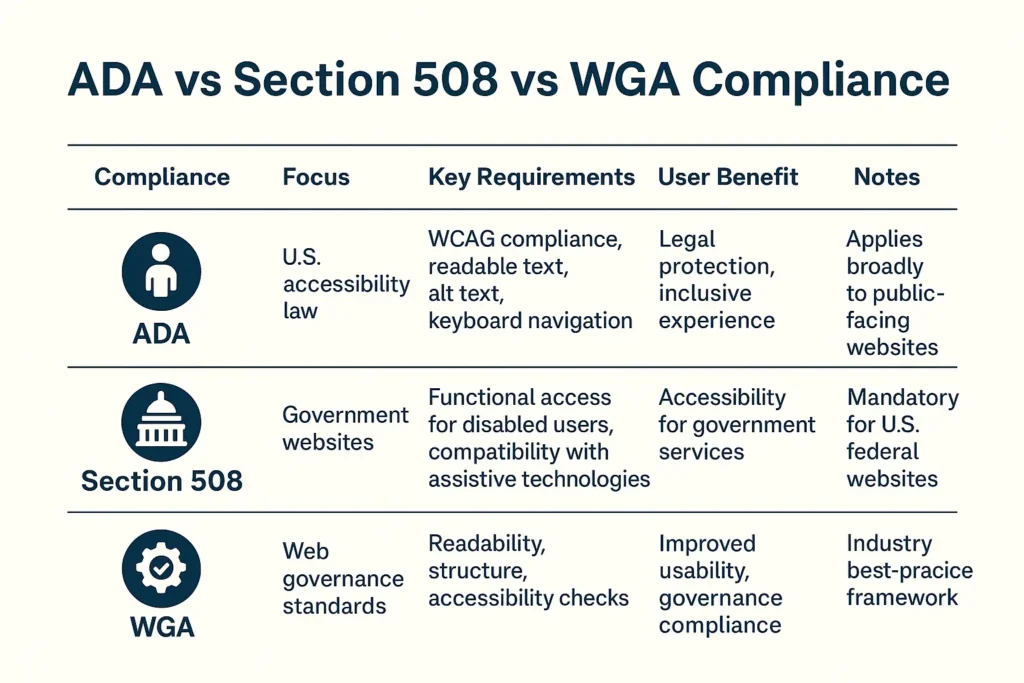
- Ensure WCAG 2.1 AA compliance for accessibility.
- Section 508 compliance for government-facing websites.
- WGA (Web Governance Accessibility) checklist comparison:
- Content readability
- Keyboard navigation
- Color contrast
- Alt-text for images
- Forms accessibility
- HTTPS security setup.
- Privacy policy, terms, and cookie notice implementation.
- ADA accessibility standards
- Regular website backups
Read our Website maintenance checklist for compliance and security best practices
Conclusion
Wrapping up, a successful website isn’t just launched; it’s planned, designed, optimized,
and maintained with care. Above are detailed website checklists.
You can also request a free website audit of your website. Explore maintenance plans for secure migration of your website.
Get in touch!
FAQS
How often should I audit my website?
At least once every quarter or after major updates (core, theme, or plugin changes).
Why use a website checklist?
It reduces launch errors, improves SEO performance, ensures compliance, and helps your team work systematically.

Popular Guides
View All Guides

