

Website Content Workflow for Agencies


Agencies may turn scattered ideas into publish-ready website content, consistent and SEO-friendly website content, with the help of an effective content process.
Content initiatives are likely to be disorganized in the absence of a well-established procedure, with ideas staying in notes, drafts being delayed, approvals being delayed and the finished products not matching the overall website plan.
The situation is even worse for agencies since a number of individuals have to be on the same page in regard to the whole process and their roles.
This is why a website content workflow is more than just the process of writing website content. Planning, producing, evaluating, approving, publishing and optimizing website content are all part of this extensive process.
A content workflow can assist you in efficiently managing any of your projects, whether they be service pages, blog articles, landing pages, case studies, website text or resource manuals, especially when supported by professional content creation service.
Read More: Creative Content: 5 Easy Ways to Create Content For Your Website
What Is a Content Workflow?
A content workflow is simply the process by which content is transformed from conception to completion, where each step along the way is well-defined and includes who is going to be doing what, what should be done at every step of the way and how content should be evaluated before going live.
For agencies, a content workflow usually includes:
- Content planning
- Keyword research
- Content brief creation
- Content writing
- Editing and proofreading
- SEO optimization
- Client review
- Design and development handoff
- Publishing
- Performance review
A good workflow removes guesswork. There is clarity about the stage that the content is in, the individual responsible for the next step and the prerequisites that need to be fulfilled in order for the content to move forward.
Why Agencies Need a Website Content Workflow
However, it is not always that easy to create website content. Website content needs to be relevant to the goals of the client, should correspond to the website architecture, should answer the users’ questions and be understood by the search engines.
Without a clear content workflow, agencies may face common problems such as:
- Missed deadlines
- Unclear responsibilities
- Repeated revisions
- Weak SEO structure
- Duplicate or thin content
- Delayed approvals
- Confusing handoffs between teams
- Inconsistent brand voice
Having the proper workflow allows the organization to stay more organized and work more efficiently. Moreover, the client experience becomes easier because everyone knows what is happening and what is expected from the clients.
Step 1: Setting Website Content Goals
Every content project should begin with a clear goal that connects to the larger website strategy. Before writing begins, the agency should understand why the content is being created.
For example, the goal may be to:
- Improve SEO visibility
- Explain a service more clearly
- Support a website redesign
- Increase leads or inquiries
- Educate potential customers
- Build authority in a specific niche
- Support a content marketing campaign
This step matters because different goals require different types of content. A service page needs to explain value and encourage action. The blog post can then lean towards education and being visible through search. The landing page will require more conversion-oriented writing.
Once you have your goal defined, the rest of the content process gets simpler.
Read Also: Website Content Development: A Complete Guide
Step 2: Identify the Audience and Search Intent
Before creating any website content, it is important for the agencies to know who will be served by that content. There will be a big difference between a page written to cater to business owners versus beginners, a technical audience or local consumers.
Questions to ask include:
- Who is the intended reader?
- What is the problem that they are solving?
- What are the questions that they have before reaching a decision?
- What might stand in their way of doing something about it?
- How much do they know about the subject matter already?
- What should they do next?
For SEO purposes, there is also the issue of search intent. In case someone searched for “content workflow”, that person may want a definition, process, template or an improved version of an existing process within the agency.
Step 3: Create a Content Calendar
Content calendars enable agencies to think ahead when it comes to content creation and development. It gives the team a clear view of what content needs to be created, when it should be published and who is responsible for each step.
A useful content calendar may include:
- Topic title
- Target keyword
- Content type
- Assigned writer
- Editor
- Due date
- Review date
- Publish date
- Status
- Notes
- Target service or page
- Internal links to include
For website content projects, a content calendar can also help agencies plan supporting blog posts around important service pages. For instance, when the targeted service is “Content Creation Services,” related blog posts would aid in marketing the particular service through the provision of answers and referring back to the home page of the service.
This increases both user experience and SEO structure.
Step 4: Write Down a Content Brief
The content brief is among the key elements in the content pipeline process. It gives guidance to the writer before starting on the actual writing.
A good content brief must have:
- Topic title
- Primary keyword
- LSI keywords
- Search intent
- Target audience
- Recommended word count
- Suggested headings
- Internal links
- External links
- Competitor or reference content
- Brand voice notes
- CTA direction
- FAQs
- SEO requirements
For agencies, the content brief helps reduce back-and-forth. Writers know what to include, editors know what to check and clients can understand the direction before the content is fully written.
A brief also protects the strategy behind the content. Instead of writing based on guesswork, the team writes with a clear purpose.
Step 5: Organize the Content Pipeline
A content pipeline shows where each piece of content is in the production process. This is especially useful when an agency is managing multiple clients or multiple website pages at the same time.
A simple content pipeline may look like this:
- Idea approved
- Brief created
- Draft in progress
- Internal review
- SEO review
- Client review
- Final edits
- Ready for design or upload
- Published
- Performance review
The pipeline should be easy for the whole team to understand. It can be managed in a project management tool, spreadsheet, content platform or agency dashboard.
The goal is simple: no one should have to ask, “Where is this content?” The status should already be clear.
Step 6: Write the First Draft
Once the brief is approved, the content writing stage begins. At this point, the writer should focus on creating helpful, clear and well-structured content.
Good website content should:
- Answer the reader’s main question
- Use simple and direct language
- Follow the content structure from the brief
- Include the primary keyword naturally
- Use related keywords where they fit
- Avoid keyword stuffing
- Include useful subheadings
- Support the reader’s next step
- Match the brand voice
For agency content, the first draft should not only sound good. It should also support the client’s website strategy. This means the content should connect to the right service, guide the reader toward action and fit within the overall website structure.
Step 7: Review for Structure and Clarity
After the first draft is complete, the editorial process begins. The first review should focus on structure and clarity.
At this stage, the editor should check:
- Does the introduction explain the topic clearly?
- Are the headings organized in a logical order?
- Does each section support the main topic?
- Is the content easy to read?
- Are there any repeated points?
- Does the content answer the reader’s questions?
- Is the CTA relevant?
- Does the article match the target service area?
This review helps make the content stronger before SEO checks and client review. It also improves the overall reading experience.
Step 8: Optimize Website Content for SEO
SEO optimization should be part of the content workflow, not something added at the last minute.
To optimize website content, agencies should review:
- Primary keyword placement
- Meta title
- Meta description
- URL slug
- H1 and H2 structure
- Internal links
- External links
- Image alt text
- Readability
- Search intent alignment
- FAQ section
- Schema opportunities
- CTA placement
For this topic, the focus keyword “content workflow” should appear naturally in the title, introduction, headings, body content, meta description and conclusion. LSI keywords such as content calendar, content writing, content planning, website content, content pipeline and editorial process should also be used naturally throughout the article.
The goal is not to force keywords into every paragraph. The goal is to create helpful content that search engines and readers can easily understand.
Also Read: Content Creation Checklist To Improve Website Content
Step 9: Add Internal and External Links
Internal links help users move through the website and help search engines understand how pages are connected.
For this article, useful internal links may include:
- Content Creation Services
- Website Content Strategy Guide
- Website Content Development Guide
- SEO Services
- Website Strategy Services
External links can be used to support definitions, statistics or helpful resources. However, they should be relevant and not distract users from the main goal of the page.
For agencies, linking should be part of the workflow. Writers can suggest links in the draft and editors or SEO specialists can confirm the final links before publishing.
Step 10: Send Content for Client Review
Client review is often where content workflows slow down. To avoid delays, agencies should make the review process simple.
Before sending content to the client, explain:
- What the content is meant to achieve
- What kind of feedback is needed
- Where comments should be added
- The deadline for feedback
- What happens after approval
It is also helpful to ask clients to focus on accuracy, tone and business details rather than rewriting the entire draft. This keeps the process productive and prevents unnecessary delays.
A clear review process helps both the agency and the client stay aligned.
Step 11: Prepare Content for Publishing
Once the content is approved, it needs to be prepared for the website. This stage may involve the content writer, designer, developer or website manager.
Publishing preparation may include:
- Formatting headings
- Adding internal links
- Uploading images
- Adding image alt text
- Setting the meta title and meta description
- Adding the URL slug
- Checking mobile layout
- Adding CTA buttons
- Testing links
- Previewing the page before publishing
For WordPress websites, this step is especially important because formatting can affect readability and user experience. A strong article can lose impact if it is uploaded with poor spacing, broken links or confusing layouts.
Step 12: Review Content After Publishing
A content workflow should not end when the page goes live. After publishing, agencies should review how the content performs.
Important things to monitor include:
- Organic traffic
- Keyword rankings
- Click-through rate
- Time on page
- Bounce rate
- Conversions
- Form submissions
- Internal link clicks
- User engagement
This data can help agencies improve future content planning. If a blog post performs well, it may lead to related content ideas. If a service page is getting traffic but not leads, the CTA or page structure may need improvement.
Content should be treated as a long-term website asset, not a one-time task.
Common Mistakes Agencies Should Avoid
Even with a workflow in place, agencies can still run into problems. Some common mistakes include:
- Creating Content Without a Clear Strategy: Publishing content just to stay active is not enough. Every piece of content should connect to a goal, service or audience need.
- Skipping the Content Brief: Without a brief, writers may miss the search intent, target keyword, internal links or CTA direction. This can lead to more revisions later.
- Making the Workflow Too Complicated: A content workflow should make work easier, not harder. If the process has too many steps, the team may stop using it.
- Ignoring SEO Until the End: SEO should be included from the planning stage. Waiting until the final draft can create extra work and missed opportunities.
- Not Assigning Clear Ownership: Every stage should have an owner. If no one is responsible for a task, it can easily be delayed.
Website Content Workflow Template
Here is a simple workflow template agencies can follow:
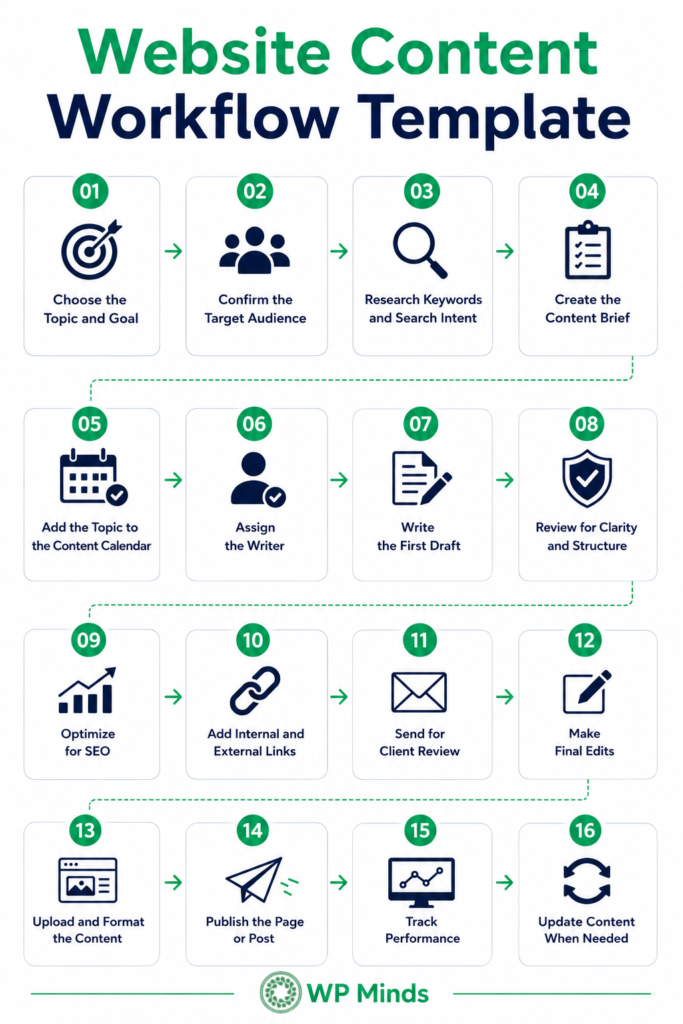
This process can be adjusted based on the size of the agency, client needs and type of content being created.
How Content Workflow Supports Website Content Strategy
A website content strategy looks at the bigger picture. It defines what content should be created, why it matters and how it supports business growth.
A content workflow supports that strategy by turning ideas into action. The strategy answers “why” and “what.” The workflow answers “how” and “when.”
For instance, if the strategy focuses on establishing authority within website content services, then the workflow would assist in planning blogs, assigning writers, editing drafts, optimizing them for search engine optimization and publishing them.
Content Strategy and Content Workflow Together Provide a Systematic Approach to Growth.
Read More: Website Content Strategy: 14 Questions to Build Your Plan
Final Thoughts
An effective content workflow will help you produce better website content without confusion and inconsistencies. Every team member will know what their responsibilities are, the content workflow will remain active and the entire editorial process will become easier to handle.
In case your agency manages several website development projects, the content workflow becomes a crucial part of the process. The workflow will ensure proper coordination between content planning, content creation, SEO, content review and publication.
Looking to improve how your agency plans, writes, reviews and publishes website content? WP Minds helps agencies build scalable content workflows that support SEO, improve collaboration and keep client projects moving on schedule. Contact us to learn how we can help streamline your content operations.
FAQs (Frequently Asked Questions)
What is content workflow?
A content workflow is defined as a series of actions that the content passes through during the process of planning, creating, editing, approving, publishing and optimizing it. A content workflow guarantees coordination between different people involved in the process.
How to create a content calendar for social media?
In order to build a social media content calendar, you should first pick up the platform, define your target audience, list down the topics and set the dates on which you will post content. You can even include other details such as the caption, image, hashtag used, campaign objectives, responsible team members and status of approval.Website Content Workflow Template – WP Minds
How to optimize website content for SEO?
For writing optimized content for SEO, you must begin by researching keywords and understanding the user’s search intention. In the content, use the main keyword within the title, headings, introduction, body, meta title, meta description and URL slug naturally. Internal links, beneficial external links, images, appropriate headings and a call-to-action button should also be added. The content must be beneficial and easily readable.
What is SEO content writing?
SEO content writing is the technique of writing the content, which helps both readers and the search engines. SEO content writing uses proper use of keywords, answers user queries, structures content, links and writes content that promotes the visibility of a website.
What is a content plan?
The content plan acts as a guide that outlines the type of content to be produced, the audience to be reached out to, the purpose of creating the content and when to publish. The plan might consist of topics to cover, keywords, content type, target audience, deadlines, responsible team members and the objectives of production.

Popular Guides
View All Guides