

WordPress Website Architecture Best Practices


Before choosing a color scheme, typography or images, every successful WordPress website starts with a well-planned architecture. This is because of the need for the right website architecture.
WordPress website architecture is the way pages, posts, categories, menus and other content are organized across websites. A good architecture helps visitors discover content fast and helps search engines explore, interpret and index it. It also provides a scalable base for website growth without requiring major structural changes.
Website architecture is the building’s blueprint, guiding layout and flow, while interior design enhances aesthetics but cannot fix flaws.
The same concept applies to the WordPress web design and development process. Good web design alone cannot address issues of disorganized navigation and lack of content organization.
A clear website structure helps visitors find information and allows search engines to understand how your pages relate.
Read Also: Website structure to take you from 0 to 1K Plus organic website traffic
Plan Your Website Structure Before You Build
The website architecture must be thought of before building starts. The addition of pages in an unplanned manner will only create duplicate content, confusing navigation and missing out on significant pages. Shallow SEO site structure keeps important pages close to the homepage and easier to discover
First Step:
Firstly, you need to establish the objectives of your website, is it for generate consultation interest, facilitate purchases, encourage event sign-ups or provide information about offerings. Every objective needs to have its own way through your website.
Second Step:
The next step is to identify the user journeys. The customer can travel from the homepage to the services page, then see the case study and eventually go to the contact page. The architecture must facilitate all that smoothly.
Create a Logical Content Hierarchy
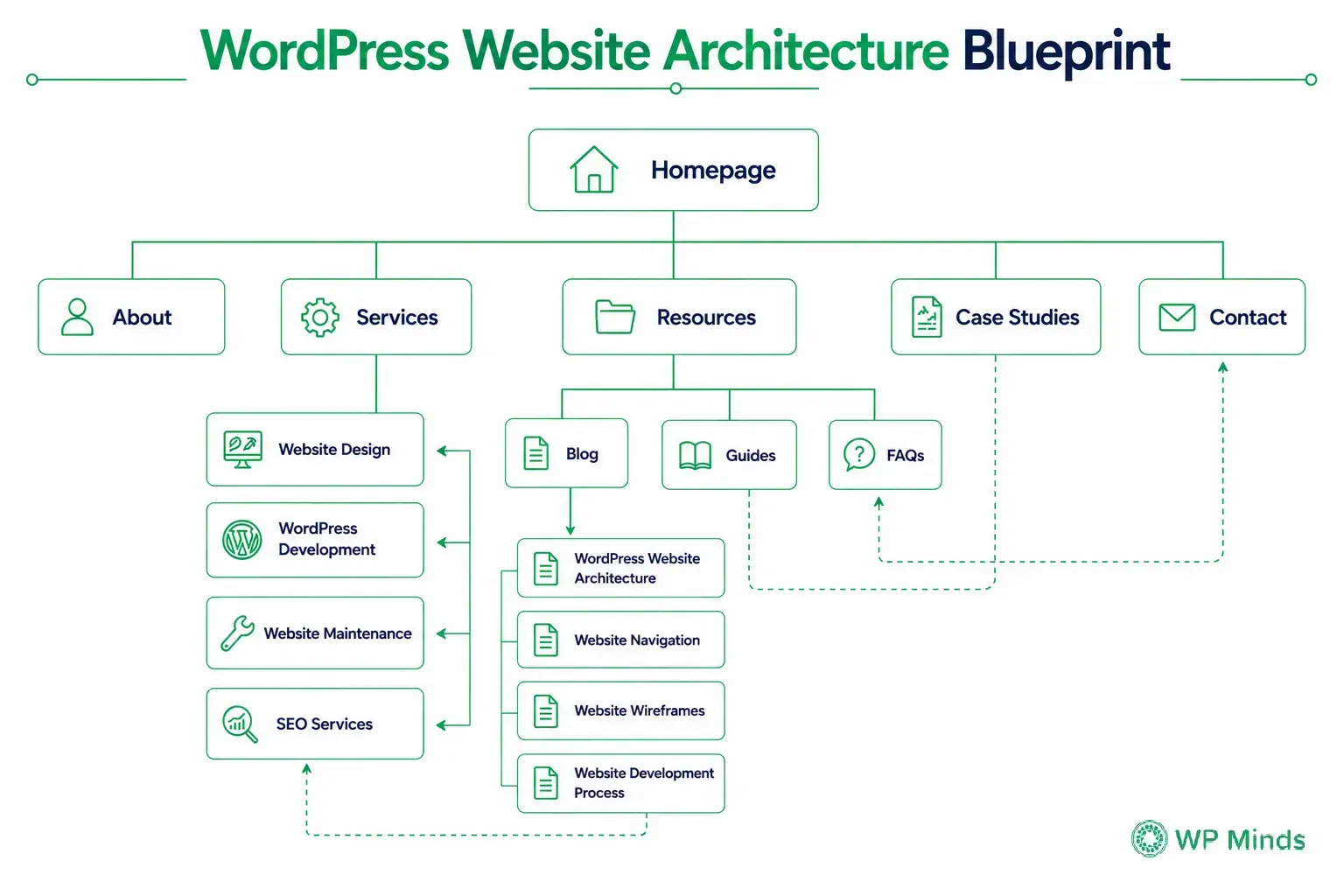
Based on your objectives, you will come up with a sensible page architecture. It will look like this:
- Homepage
- About
- Services
- Individual service pages
- Resources
- Blog posts
- Guides
- Case Studies
- Contact
It is easy to identify how each broad page is connected to a subpage in this hierarchy. It also helps to determine which pages should be included in the main navigation menu.
Also Read: Website Navigation Structure: What Every Business Should Include
Test the Structure With Website Wireframes
The website wireframe is an effective tool that allows testing the structure of the site before the actual design process and coding begin. It allows seeing how navigation, content sections and call to actions will work without visual design.
It is possible to group the related content into a content hub. The content hub includes a pillar page on a general subject and several articles that answer more narrow questions about this broad theme.
For instance, a pillar page on Website Development could have links to helpful tips on Website Strategy, Website Wireframes and Website Development Process. This structure makes topical authority stronger and makes it easier for visitors to find content that is connected.
Build a Strong Information Architecture
Strong information architecture organizes and labels content according to your visitors’ needs.
Strong information architecture answers several questions:
- What information does the website contain?
- How should that information be grouped?
- What labels will visitors understand?
- How will users move between related sections?
Your menu labels should reflect the language your audience uses. Creative labels may appear distinctive, but they can make navigation confusing. Clear labels such as “Services,” “Case Studies,” and “Contact” usually provide a better experience.
Content hierarchy also matters within each page. Each page needs a clear topic with headings for easy scanning and improved search engine recognition.
Your WordPress content model should support this information architecture. Pages, posts, categories, tags and Custom Post Types each serve different purposes.
Choose Categories vs. Tags Carefully
Categories organize posts into broad, hierarchical topics. For example, a digital agency could organize its blog into categories such as website strategy, WordPress development, SEO and website maintenance, making it easier for visitors to browse related topics.
Subcategories can create another level when necessary. However, avoid building several layers unless you publish enough content to support them.
Tags create relationships across categories. For example, posts from different categories might share tags such as “small business,” “ecommerce,” or “accessibility.”
Understanding categories vs. tags prevents unnecessary archive pages. Creating a new tag for every minor phrase can produce dozens of thin archives containing only one post. These pages provide little value and may create unnecessary duplication.
Use a limited set of meaningful categories. Create tags only when they connect several relevant pieces of content. Review category and tag archives regularly and remove or consolidate those that no longer support your website structure.
Use Custom Post Types When Needed
Default WordPress pages and posts work well for many websites. However, they may not provide enough organization for websites with specialized or repeatable content.
Custom Post Types allow developers to create separate content structures for items such as:
- Portfolio projects
- Case studies
- Team members
- Testimonials
- Events
- Resources
- Locations
For example, storing every team member as a standard page can make content management difficult. A Team Member Custom Post Type can provide consistent fields for names, job titles, biographies, photographs and contact details.
Custom Post Types also make templates more consistent. When one field changes, developers can update the template instead of editing every entry individually.
Do not create a Custom Post Type simply because you can. Use one when content has a distinct purpose, requires repeatable fields or needs its own archive and filtering options. Each Custom Post Type should support the broader website architecture rather than adding unnecessary complexity.
Also Read: How to do your own SEO – A complete guide
Create an SEO-Friendly URL Structure
A clean URL structure tells visitors and search engines what a page covers before they open it.
Keep URLs short, descriptive and easy to read. Remove unnecessary dates, numbers and filler words whenever possible.
Choose a consistent WordPress permalink structure during the website development process. Changing it after launch can create broken links, redirect chains and lost traffic if redirects are not handled correctly.
Avoid changing existing URLs only to make minor improvements. If a URL must change, create a permanent 301 redirect from the old address to the new one. Update internal links, canonical tags, navigation and XML sitemaps as part of the change.
Add Breadcrumbs and Relevant Internal Links
The breadcrumb trail is another method that reflects website hierarchy. It informs the visitor about the place of the current page within the overall website hierarchy. Breadcrumb trails also assist search engines in determining connections between different sections of the website.
Links must further establish such connections. Link service pages to related case studies, guides, FAQs and options for contacting you. Ensure that articles supporting your primary content are linked to it.
Avoid using generic anchor text such as “click here.” A link titled “explore our website strategy process” provides both users and search engines more information.
Each valuable page must be linked from some other page with relevant Internal linking structure. Otherwise, you will have an orphan page that won’t be easily accessible by users and search engines.
Keep Your WordPress Architecture Scalable
A WordPress website should support future growth, not only the content available on launch day.
Begin with a stable theme structure. If you are customizing an existing theme, use a child theme. A child theme keeps custom code separate from the parent theme, allowing the parent theme to receive updates without overwriting your changes.
For a fully customized website, your development team may build a dedicated theme that reflects the approved website strategy and wireframes.
Choose plugins carefully. Every plugin becomes part of the website’s technical architecture. Too many overlapping plugins can create performance problems, security risks and maintenance conflicts.
Before installing a plugin, consider whether it is actively maintained, compatible with your WordPress setup and truly necessary. Avoid using several plugins to provide similar features.
You should also plan for content growth. A website with five case studies today may contain 100 in two years. Consider how visitors will search, filter and browse that content as the collection expands.
Early planning for website architecture improves SEO, reduces technical costs and saves time. Our WordPress Design & Development team assists in creating scalable architectures for new or restructured sites.
Conclusion
Website architecture is crucial for WordPress success, impacting visitor navigation, search engine crawling and team management. Effective architecture integrates strategy, information structure, content hierarchy, URL structure and technical development for optimal usability and maintenance.
Use this practical checklist before beginning your next WordPress design and development project:
- Plan the page hierarchy before design begins.
- Organize related content into clear hubs.
- Keep important pages within three clicks.
- Use categories and tags consistently.
- Create custom post types when appropriate.
- Build short and descriptive URLs.
- Add breadcrumbs and contextual internal links.
- Choose themes and plugins with future maintenance in mind.
- Build for future growth instead of today’s content alone.
Related Blogs:
- WordPress SEO for a Brand New Website
- Website Redesign Strategy: Improve SEO, UX & Conversions
- Non-Negotiable WordPress Maintenance Tips To Follow in 2026
FAQ’S
How to optimize website architecture for SEO?
Create a hierarchy of logical pages, keep key pages under three clicks away. Use descriptive URLs, breadcrumbs, XML sitemaps and contextual internal links. Make sure every valuable page can be reached through an internal link.
How to show the architectural design of a website?
A good way of showing the architecture of the website is by creating a visual sitemap. It starts with the homepage, primary sections and the child pages and then other support contents. You will then use website wireframes to explain how the users will move between different sections.
What are the top SEO considerations for website architecture?
Some of the key considerations include; crawl depth, internal linking, consistent URL, mobile navigation, breadcrumb, indexed category pages and no orphan content among others. The structure should be able to demonstrate clear topical relationships
What are the four components of information architecture?
The four information architecture components are organization, labeling, navigation and search systems.
Why is website architecture important for SEO?
It allows search engines to access, index and comprehend your web pages. Website architecture enables you to distribute internal authority, create connections between various topics and prevent orphaned pages from appearing on your website.

Popular Guides
View All Guides