

Website Assessment – A Comprehensive Guide


Your website does not start producing results as soon as you launch it. This is why continuous website assessment and optimization is necessary.
Getting results from your website requires constant care, attention, and optimization.
This is a comprehensive guide on website assessment and optimization. We’ll go over the following in this post:
- Website assessment and its importance
- Website assessment checklist
- Best website assessment tools
- Website assessment services
- Lots more
So let’s dig in and improve your website!
Importance of website assessment
Website assessment helps to determine the problems or improvements needed on your website and allows you to evaluate the effectiveness of your website in achieving its intended goals
These factors are very important for a website’s performance and SEO.
There are multiple tools you can use for website assessment.
Implementing these suggestions can help your website in multiple ways, including:
- Search engine rankings
- Attracting and retaining users
- Website speed
- Website performance
- Expanding your reach (Devices etc)
- Keeping it user friendly
- Keeping the website up to date
- Generating leads and sales
By identifying strengths and weaknesses, you can make data-driven decisions to improve your website’s performance, enhance user engagement, and achieve your business objectives and website goals.
Website assessment checklist
Website assessment involves all the aspects of your website, including:
1. Website speed
Website speed is one of the most important factors Google considers while ranking a website. It is important that your website is optimized for speed for devices as well as desktop.
This is not only important for SEO but also for user experience and retention. If your website takes too long to load, you may lose your potential customers to your competitors.
There are multiple tools that can be used to check the website’s speed, we’ll explore them in detail below.
However, your website should always be in the green zone at least.

Here are some key points to consider to optimize your website for speed:
- File minification
- Website security should be great
- Always optimize and compress media
- Keep the page cache enabled
- Avoid hosting videos on the website
- Keep the website up to date (Theme, plugins)
- High-quality website hosting platform
- Use a plugin for speed optimization
Website speed optimization is crucial for your online success.
Lazy Loading for Faster Performance
One of the quickest ways to improve loading time is to enable lazy loading. This technique delays the loading of images and videos until the visitor actually scrolls to them, reducing the initial page size.
How to do it in WordPress: Install and activate the a3 Lazy Load plugin (or use WP Rocket if you want a premium all-in-one performance solution). Once activated, images, videos, and iframes will only load when needed, improving both speed and Core Web Vitals.
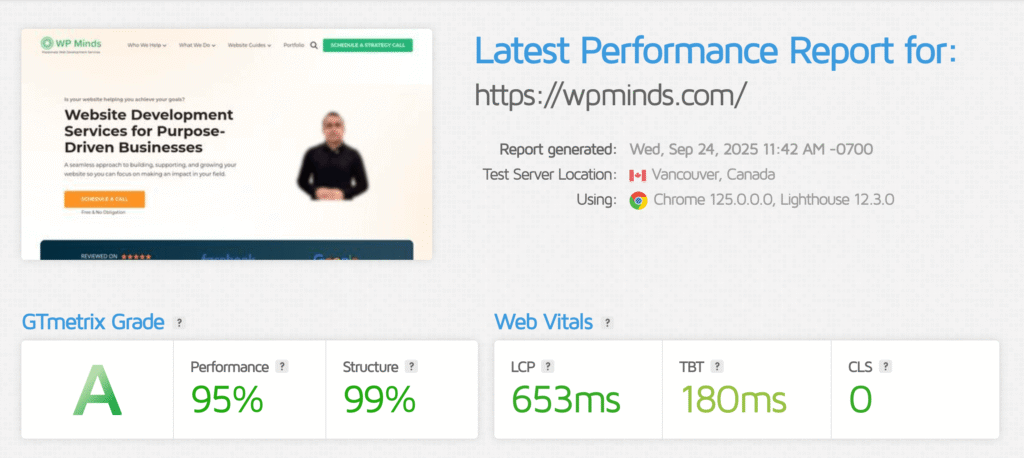
Check out your website speed score here.
2. Website performance
After speed optimization, you need to look out for your website’s performance and make sure it’s always in the green zone.
As mentioned above, there are multiple tools for this as well.
Website performance, according to Google and our own experience,e consists of four things.
- Accessibility
- Speed
- Security
- SEO
We have already covered speed, but is important to make sure that your website up to the mark with Accessibility, security and SEO as well.
For website accessibility, you need to make sure that your website is ADA compliant as it has become a law in most countries.
3. Website security
Website hacking has become very normal these days, especially if your website is on WordPress, it is at a higher risk, since it is the most popular CMS.
And again, it is also crucial to rank on search engines, sites that are not secure can have a negative impact on your website’s SEO
You can focus on the following points to make sure your website’s security is never compromised.
- Keep the core website software updated
- Plugins and themes should always be up to date
- Avoid using common user names and passwords
- Remove themes and plugins that are not in use
- Ensure SSL certificate is installed and activated
- Limit login attempts
- Use two-factor authentication
- Use security plugins
Many WordPress sites are left vulnerable because owners don’t update their PHP version or still use the default “admin” username. Both are easy fixes
Pro tip
Always update to the latest PHP version supported by your hosting provider, and create a unique username with strong, random passwords. Pair this with a plugin like Wordfence to monitor login attempts and block malicious IPs.
Website security is not only important for SEO and users, but for your business as well. You invest your time, money, and resources to build a consulting website. If it’s not secure, you might end up losing all of it.
4. Google Indexing
It is important to keep a regular check on your website pages that Google is indexing.
You don’t want low quality and poor content pages to be indexed by search engines.
It is ideal to keep the following pages no-indexed:
- Thin content pages
- Archives pages
- 404 pages
- Old content posts/pages (News, press release etc)
- Low quality pages
As important it is to keep such pages no-index, it is equally important to ensure that your quality pages are being indexed by Google.
You can use Google Search Console for this purpose.
5. Mobile optimization
Do you know over 52% of web traffic comes in from mobile users?
That’s reason enough why mobile conversion optimization can not be ignored.
A site can look great on desktop but an absolute mess on devices if they are not optimized properly.
Here’s how you can keep your website mobile optimized:
- Keep the mobile design simple
- Work on mobile speed optimization
- Enable browser caching
- Use mobile friendly pop-ups
- Keep the structure mobile friendly
- Eliminate unnecessary distractions
You can also check mobile performance through various optimization tools and work on the insights they provide.
Website assessment tools
Website assessment tools are software programs designed to evaluate and analyze various aspects of a website.
These tools can help website owners and developers identify issues and areas for improvement, as well as monitor website performance and security.
Website assessment tools can also be classified as the following:
- Website performance and speed testers
These tools analyse website speed, load times, and other performance metrics to identify areas for optimisation. Examples include Google PageSpeed Insights, GTmetrix, and Pingdom. - Accessibility checkers
These tools evaluate a website’s accessibility and compliance with web accessibility standards. Examples include Wave and AChecker.
Get a free website compliance audit
- Search engine optimisation (SEO) analysers
These tools evaluate a website’s content and structure to identify opportunities for optimising search engine rankings. There are hundreds of tools out there for this purpose. Examples include SEMrush, Moz, and Ahrefs. - Security scanners
These tools analyse a website’s security vulnerabilities, including malware infections, outdated software, and other potential security risks. Examples include Sucuri, Qualys, and Nessus. - Content analysis tools
These tools evaluate the quality and relevance of a website’s content, including readability, keyword density, and other metrics. Examples include Yoast SEO, Hemingway, and Grammarly.
These tools can be used individually or in combination to provide a comprehensive assessment of a website’s overall performance, security, accessibility, and SEO.
Google PageSpeed Insights
This is a speed and performance tool by Google. It is quick and easy to use.
Also, it shows your site’s speed and performance on both desktops and devices. It rates your performance between 1-100 and also gives recommendations to improve it.

GT Metrix
It is one of the most popular tools used by professionals. It crawls the entire website and gives a detailed report along with suggestions and improvement recommendations.
Ahrefs
It is an SEO tool designed to help you in getting a higher search engine ranking through various ways, including keyword research, site audits, and link building, as well as domain ranking and so on.

Ubersuggest
Ubersuggest is a tool by Neil Patel, it helps to generate new keyword ideas and optimize search engine rankings.
Using the tool, you can improve your content marketing strategy for your website as it gives various metrics like rankings, SEO score, etc.

Google Search Console
Google Search Console measures your site’s traffic and performance. This tool crawls your entire website and also gives a detailed report with suggestions to improve it’s performance.
It provides metrics like page views, SEO score, ranking keywords, geolocations, and how visitors interact with your website.

SE Ranking
SE Ranking is an intuitive SEO platform that covers all essential optimisation tasks.
It offers a full suite of tools for website assessment, including a technical website audit, on-page checker, rank tracker, backlink checker, competitive research, and more.
Besides evaluating and improving your website’s performance, you can use SE Ranking for other tasks, like content creation and managing your local online presence.

Website auditing service
Website audit services review your website manually and share a detailed report with actionable steps that you can implement to improve your website on your own.
It includes all the missing elements on your website to improve the conversion rate as well as design and content issues.
Also, it provides a detailed SEO report that includes the following:
- Current rankings
- Domain authority
- Keyword suggestions
- Website performance report
- Technical audit
- Traffic overview
- And so on
Conclusion
Conducting regular website assessment is essential to improve your website performance and increase leads for your business.
By doing regular website audits and reviews, you can identify issues and fix them on time.
However, if you need help with your website audit or assessment, feel free to shoot us an email using this form.
If you’re looking to improve your website and make sure it is regularly optimized and updated, check out our extensive WordPress Maintenance Plans.
Is the website assessment free?
Yes, we offer a free initial assessment. More detailed audits or ongoing monitoring are available through our service plans.
Will a website assessment affect my site’s performance?
No. All assessments are non-intrusive. We run tests externally and review site performance data without disrupting your website.
What do I need to provide for a website assessment?
Usually just your website URL. For deeper technical audits, limited backend access may be required.
How long does a website assessment take?
An automated scan takes just minutes, but a professional manual audit typically takes 2–3 business days to ensure accuracy and actionable recommendations.
What is included in a website assessment?
A website assessment reviews key performance areas including speed, security, mobile responsiveness, SEO, and overall user experience. At WP Minds, we also benchmark your site against competitors to highlight missed opportunities.

Popular Guides
View All Guides

